Getting started
Generate a script with AI
Staring at a blank editor? Describe the story in one line and AI writes the entire conversation for you — you're then free to edit any of it.
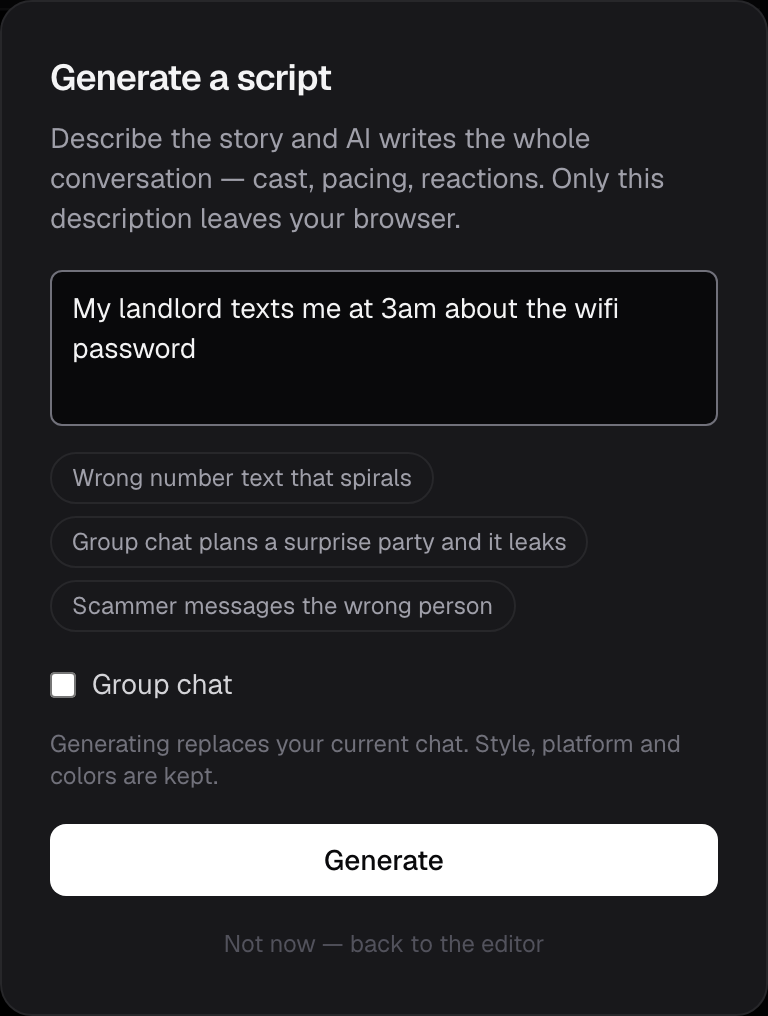
How to use it
- In the editor, open Generate a script (the ✦ Generate button).
- Type the premise — a sentence is enough. "My landlord texts me at 3am about the wifi password." Tap a suggestion if you want a starting point.
- Toggle Group chat if you want several participants instead of one.
- Press Generate. In a few seconds the conversation drops straight into the editor.
What it writes
The generator is tuned for the text-story format, not generic chat:
- A hook in the first two messages — conflict, mystery or an unhinged opener, because that's what stops the scroll
- Short, punchy bubbles that escalate and land on a punchline or cliffhanger
- A named cast — everyday first names, never real people or brands
- Dramatic pacing — the occasional pause before a big beat
- Reactions and the odd quoted reply, used sparingly
- Group chats with 3–4 participants who sound like different people
It fits your style
Generating replaces the messages in your current chat but keeps everything else you've set up — platform, light/dark mode, contact photo, colors and format. So you can lock in an iMessage dark 9:16 look, then generate script after script into it.
Every message stays fully editable afterwards. Treat the output as a strong first draft: tweak a line, change who sends what, add a photo or voice note.
Limits and cost
The free plan includes 10 AI scripts per month. Chatimator Pro ($5.99/month) raises that to 200 scripts per day, alongside unlimited watermark-free exports.
Privacy
Only the topic you type is sent off your device to generate the script. Your actual conversations, media and exports still never leave the browser — see what leaves your device.
Use it responsibly
Generated conversations are fiction. Label them clearly, and don't use them to impersonate real people or deceive anyone. The generator refuses real names, brands and anything unsafe by design.