Text Message Generator
Generate a realistic conversation — then export it as a video or a screenshot.
Chatimator is a text message generator that goes further than the classic screenshot tools: you write (or AI writes) a conversation, and it renders as a pixel-faithful iMessage, WhatsApp or Instagram DM thread — complete with status bars, avatars, timestamps, receipts and typing indicators. From the same project you can export a still PNG screenshot or a fully animated MP4 with message sounds — up to 1080p 60fps on Pro.
Every part of the generated conversation is editable: contact name and photo, per-message timestamps, delivery receipts, reactions, quoted replies, photos, voice notes and group members. Prefer not to write it yourself? Describe the premise in one line — 'wrong number text that spirals' — and the AI script generator produces the whole thread for you to tweak.
Example: Dad discovers voice-to-text
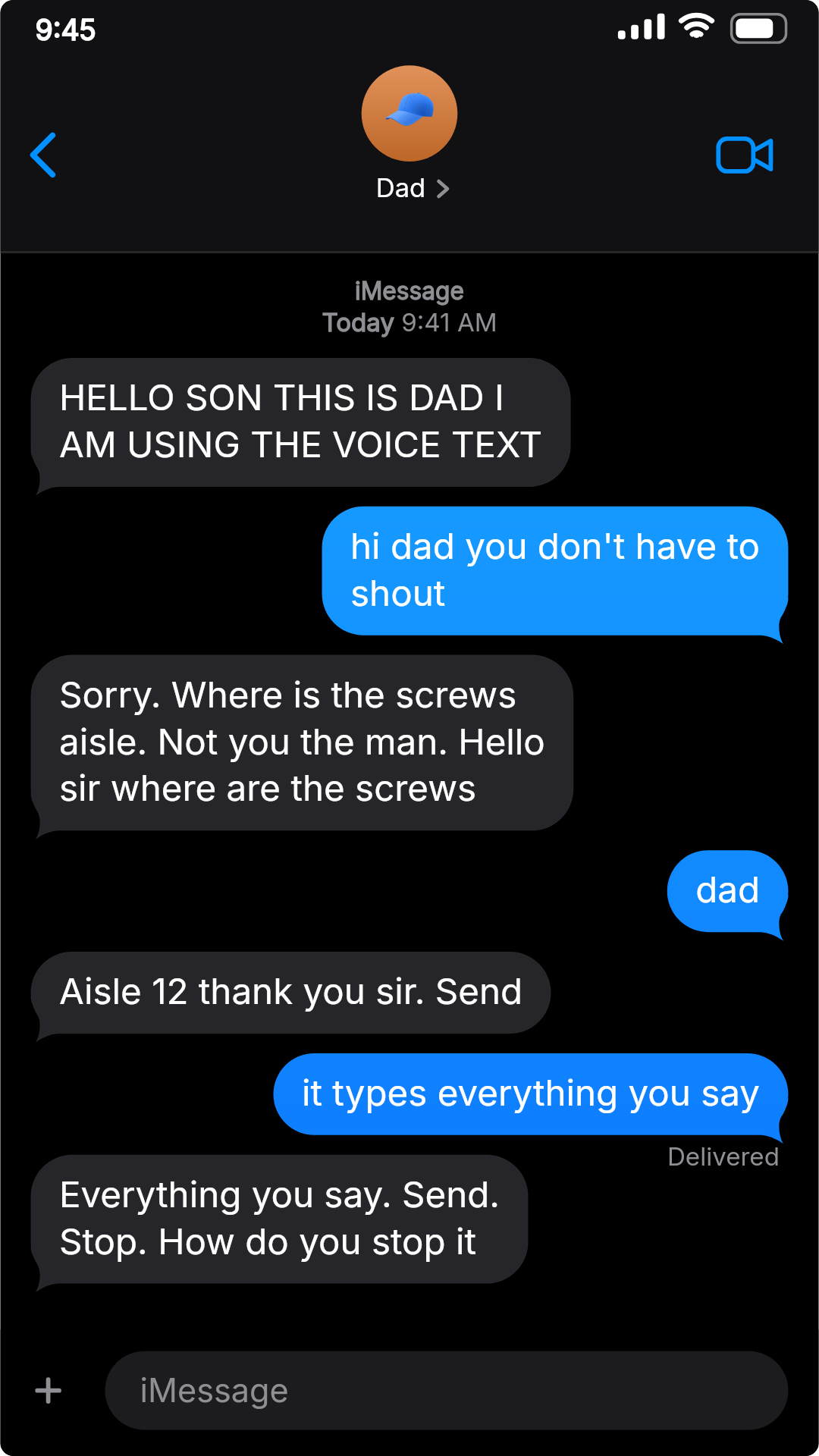
- Dad: HELLO SON THIS IS DAD I AM USING THE VOICE TEXT
- You: hi dad you don't have to shout
- Dad: Sorry. Where is the screws aisle. Not you the man. Hello sir where are the screws
- You: dad
- Dad: Aisle 12 thank you sir. Send
- You: it types everything you say
- Dad: Everything you say. Send. Stop. How do you stop it
Written from a one-line premise — 'dad discovers voice-to-text in a hardware store' — the kind of prompt you can hand the AI script generator. It's shown on the iPhone SE layout: the classic home-button look with an opaque header bar. iMessage, dark mode.
What you get
Three platforms, both modes
Generate iMessage, WhatsApp or Instagram DM conversations in dark or light mode, with iOS or Android chrome.
Video and screenshot output
One conversation exports as an animated MP4 with typing indicators and sounds, or as a PNG still — both from the same renderer.
AI script generation
Give it a one-line premise and it generates the full conversation: cast, pacing, reactions and punchline, ready to edit.
Every detail editable
Names, avatars, timestamps, receipts, reactions, replies, media and group members are all under your control.
Private by architecture
Generation and rendering happen in your browser — conversations are never uploaded to a server.
How it works
- 1
Write or generate the messages
Type the conversation yourself, or describe the story and let AI generate the script.
- 2
Style the chat
Pick the platform, mode, device chrome, contact details and video format.
- 3
Export
Sign in with a free account and download an animated MP4 or a PNG screenshot.
Prompts that get a good script from the AI generator
- Name the relationship
- 'Dad', 'my landlord' or 'my ex' gives the AI a voice to write in; 'two people' doesn't.
- Describe the conflict, not the dialogue
- Say what goes wrong — 'dad discovers voice-to-text in a hardware store' — and let the generator find the lines.
- Hint at the ending
- If you know how it should end, say so: '…and accidentally texts the whole family group'. Otherwise you may get a tidy ending instead of a punchline.
- Turn on group chat for ensembles
- With group chat enabled, the generator writes a three- or four-person cast with distinct voices.
- Rewrite the last line yourself
- The AI gets you a solid draft in seconds; the final message is where your own sense of humour makes the difference.
How the AI script generator works →
Frequently asked questions
Is this text message generator free?
Free to start. Writing and previewing conversations is free without an account; the free plan includes one 720p export per month (with a small watermark) and 10 AI scripts per month. Pro ($5.99/month) unlocks unlimited 1080p 60fps exports with no watermark and 200 AI scripts per day.
Can it generate a video, not just a screenshot?
Yes, that's the point: the same generated conversation exports as an animated MP4 (1080p 60fps on Pro) with typing indicators and message sounds, or as a PNG if you only need the still.
Which apps can the generated messages look like?
iMessage, WhatsApp (iOS or Android styling) and Instagram DM — each with platform-correct bubbles, ticks, receipts, voice notes and typing indicators, in dark and light mode.
Can AI write the text conversation for me?
Yes. Describe the story in a sentence and the AI script generator writes the whole conversation, including group-chat casts and pacing. You can edit every message afterwards.
Are generated conversations uploaded anywhere?
No. Rendering is client-side and projects live in your browser's local storage. Only an opt-in AI script request sends the topic you type — nothing else.
Related tools
Try it now — free to start
Open the editor, write your first conversation and preview it instantly — then export with a free account.
Open the editor