Fake WhatsApp Chat Generator
Green bubbles, blue ticks, voice notes and the doodle wallpaper — on iOS or Android.
Chatimator reproduces WhatsApp's look precisely: the doodle-pattern wallpaper, green outgoing bubbles with in-bubble timestamps and double blue ticks, the contact header with avatar and 'online' status, and per-message times that you control. Switch between iOS and Android chrome — the status bar, back arrow and font change to match the device.
WhatsApp-specific details go deep: voice messages render with the sender's avatar, mic badge, rounded waveform and progress dot exactly like the app; group chats show colored sender names inside bubbles; and quoted replies use the colored-bar style WhatsApp users recognize instantly.
Example: The landlord's “small update”
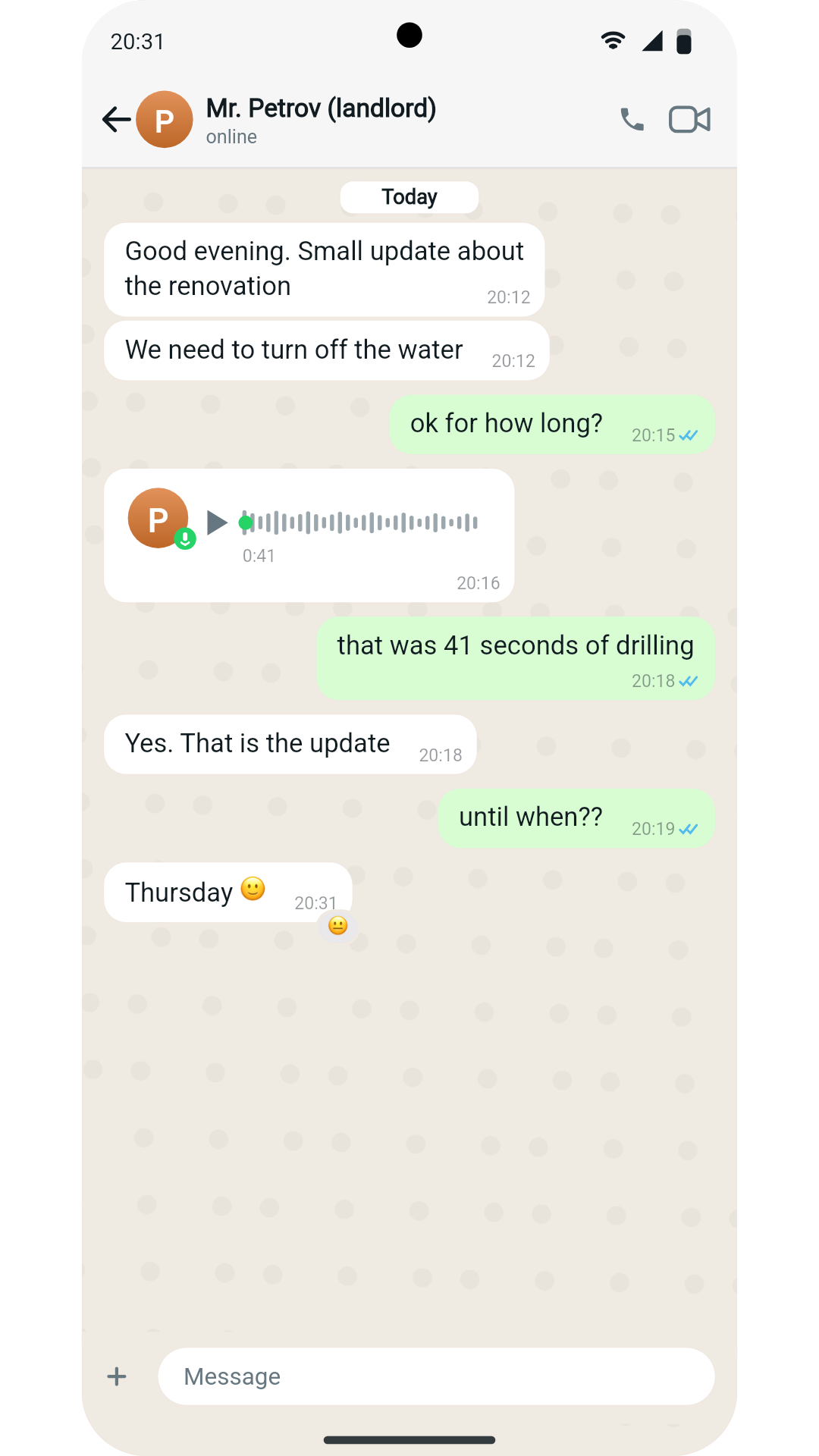
- Mr. Petrov (landlord): Good evening. Small update about the renovation
- Mr. Petrov (landlord): We need to turn off the water
- You: ok for how long?
- Mr. Petrov (landlord): 🎤 Voice message (0:41)
- You: that was 41 seconds of drilling
- Mr. Petrov (landlord): Yes. That is the update
- You: until when??
- Mr. Petrov (landlord): Thursday 🙂· reacted 😐
24-hour in-bubble timestamps that move forward like a real evening, a voice note nobody in the video plays, and a reaction on the last message. WhatsApp light mode on Android (Pixel 8), so the status bar, back arrow and font match a real Android phone.
What you get
Blue ticks & timestamps
Double blue ticks on sent messages and per-message in-bubble times you can edit, with inherited times for messages in between.
Real voice-note design
Avatar with mic badge, waveform with progress dot, duration label — the exact WhatsApp voice message anatomy.
iOS and Android
One click switches the status bar, back arrow and typeface between iPhone and Android styling.
Group chats
Multiple members with colored names inside bubbles, stacked avatars in the header and a member list subtitle.
Animated or still
Export an animated MP4 with sounds and typing indicators, or a clean PNG screenshot.
How it works
- 1
Pick WhatsApp
Select the WhatsApp skin, choose dark or light and iOS or Android.
- 2
Build the chat
Write messages, set times shown on each bubble, add voice notes, photos, reactions and replies.
- 3
Export
Download the animated video or screenshot — the free plan includes one export a month.
How to make a fake WhatsApp chat look real
- Make time move
- Set a time on the first message and on every real pause. A reply two minutes later, then a gap of twelve, tells a story on its own; the same time on every bubble looks generated.
- Match the clock to the region
- Most WhatsApp users outside the US see a 24-hour clock. '20:16' reads European; '8:16 PM' reads American. Set it to where your characters live.
- Pick Android for most audiences
- WhatsApp's biggest markets are majority-Android. The OS switch changes the status bar, back arrow and font to what those viewers see on their own phones.
- Hide the twist in a voice note
- A voice message nobody in the video plays is the perfect place for a reveal — the reply after it tells the viewer what was said.
- Blue ticks mean read
- Double blue ticks tell the viewer the message has been seen. A long gap after blue ticks before the answer is WhatsApp's own cliffhanger.
How voice notes, media and reactions work →
Frequently asked questions
Does it show WhatsApp's blue ticks?
Yes, sent messages show double blue ticks next to the in-bubble timestamp, exactly like read messages in WhatsApp.
Can I fake a WhatsApp voice message?
Yes — voice notes render with the sender's avatar, green mic badge, waveform and duration. You set the duration; the conversation pacing adapts to it.
Android or iPhone WhatsApp — which does it imitate?
Both. The OS switch changes the status bar, back arrow and font so the chat matches either device.
Can I change the time shown on each message?
Yes. Every message has its own editable timestamp; messages without one inherit the previous message's time, like a real conversation flow.
Related tools
Try it now — free to start
Open the editor, write your first conversation and preview it instantly — then export with a free account.
Open the editor