How to Make a Fake Text Message Video
From a blank chat to a post-ready MP4 in a few minutes — step by step.
A fake text message video is a conversation that plays out like a screen recording of a real phone: bubbles pop in one by one, typing dots pulse before each reply, and message sounds land on cue. It's the format behind most text-story videos on TikTok, Reels and YouTube Shorts.
You don't need a phone, a screen recorder or a video editor to make one. The steps below use Chatimator, which animates the chat and exports the MP4 directly in your browser — the free plan includes one watermarked 720p export a month, and Pro removes the watermark and goes up to 1080p 60fps.
Example: The plant-sitting update
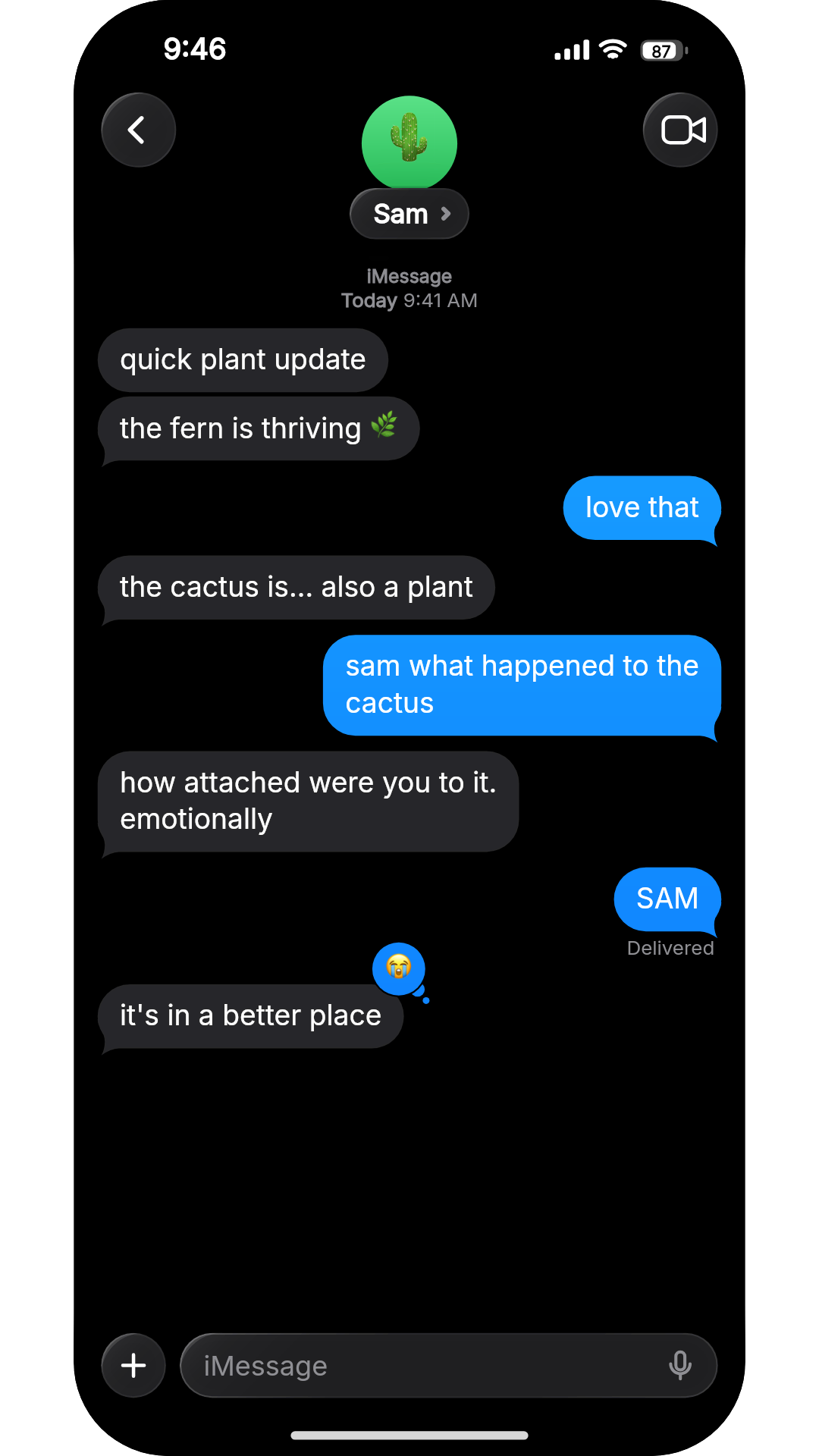
- Sam: quick plant update
- Sam: the fern is thriving 🌿
- You: love that
- Sam: the cactus is… also a plant
- You: sam what happened to the cactus
- Sam: how attached were you to it. emotionally
- You: SAM
- Sam: it's in a better place· reacted 😭
A friend sends progressively worse updates while watering your plants. Short bubbles keep the pops coming, a 3-second Wait holds the last reply back so it lands on its own, and a single reaction is the button on the joke. iMessage, dark mode, iPhone 15 Pro — this is the final frame of the exported video.
What you get
Three platforms, pixel-faithful
iMessage, WhatsApp and Instagram DM skins with correct bubbles, status bars, ticks, timestamps and typing indicators — in light and dark mode, on iOS or Android chrome.
Video export in your browser
Animated MP4 exports up to 1080p 60fps. Start free with one export a month; Pro ($5.99/mo) removes the limits and the watermark.
Message sounds included
Send and receive tones are baked into the exported audio track, so the video is post-ready without an editing app.
Rich messages
Photos, videos, voice notes with waveforms, emoji reactions, quoted replies, group chats with named members, and per-message timestamps.
Rendered on your device
Powered by WebCodecs — no uploads, no queues, no server ever sees your script.
How it works
- 1
Write the conversation
Open the editor and type messages like you'd text them — Enter adds a bubble and the sender alternates automatically. Stuck for a story? Describe the premise in one line and let the AI script generator write the whole chat.
- 2
Pick the app and the contact
Choose iMessage, WhatsApp or Instagram DM, dark or light mode and iOS or Android styling, then set the contact's name and photo so the header looks like a real thread.
- 3
Tune the pacing
Preview the video and adjust timing: typing indicators scale with message length automatically, and you can add extra wait time before any message for a cliffhanger beat. Turn on keyboard mode to show messages being typed.
- 4
Choose the format
Pick 9:16 for TikTok, Reels and Shorts, 1:1 for feeds, or 16:9 for YouTube, and set the backdrop behind the phone.
- 5
Export and post
Sign in with a free account, press Export and download the MP4 — with message sounds already mixed in — in seconds. Prefer a still? Grab a PNG screenshot instead.
Which app should your fake text video use?
The platform skin isn't decoration — viewers read it as a cue about who is texting and where. Pick it on purpose:
- iMessage
- Relationships, roommates and family drama aimed at a US audience. Blue bubbles read as 'real friends texting' to American viewers instantly.
- International audiences, family groups and anything involving voice notes. Across Europe, Latin America, India and the Middle East it's the default messenger, so the skin feels local.
- Instagram DM
- Strangers, creators and brands — the ex sliding in, the suspicious 'collab' offer, the fan who found your account. A DM implies the two people don't have each other's numbers, which is a story in itself.
- Lock screen
- When the story is told by alerts rather than a conversation: a bank transfer, a wall of missed calls, one message preview you can't stop reading.
- Dark or light
- Dark mode looks more cinematic and matches most phones at night; light mode reads as a casual everyday screenshot. Keep one per series so episodes are recognisable.
Frequently asked questions
Is Chatimator free?
Free to start. The editor — all three platform skins, group chats, media messages, sounds and the preview — is free to try without an account. The free plan adds one 720p export per month (with a small watermark) and 10 AI scripts per month; Pro ($5.99/month) unlocks unlimited 1080p 60fps exports with no watermark, all device frames and 200 AI scripts per day.
Does the video have a watermark?
Free-plan exports carry a small watermark at 720p. Pro exports are clean 1080p 60fps MP4 files with no watermark or branding.
Do my conversations get uploaded anywhere?
No. Chatimator renders entirely in your browser using WebCodecs. Scripts are saved to your browser's local storage and never sent to a server.
What formats can I export?
MP4 video (H.264 + AAC) in 9:16, 1:1 or 16:9 — 720p on the free plan, 1080p 60fps on Pro — plus PNG screenshots. Browsers without H.264 encoding fall back to WebM.
Is it legal to make fake text videos?
Fake chats for fiction, skits, ads and mockups are a standard creative format. Don't use generated conversations to defame real people or commit fraud — label fictional content clearly.
Related tools
Try it now — free to start
Open the editor, write your first conversation and preview it instantly — then export with a free account.
Open the editor