Free to start — Pro from $5.99/mo
Fake Text Message Video Maker
Turn a text conversation into an animated fake text message video. Write the chat — or let AI script it from a one-line idea — press play, and export an iMessage, WhatsApp or Instagram video with typing indicators and message sounds, rendered privately in your browser and ready for TikTok, Reels and YouTube Shorts.
An actual export — sound on in the real file
Three steps, then you're posting
Write the conversation
Pick a platform, name your contact, type the messages — or let AI script it from a one-line idea.
Watch it play
Live preview with typing indicators, bubble animations and auto-scroll.
Export & post
Sign in and export an MP4, rendered in seconds right in your browser — up to 1080p on Pro. Or grab a PNG.
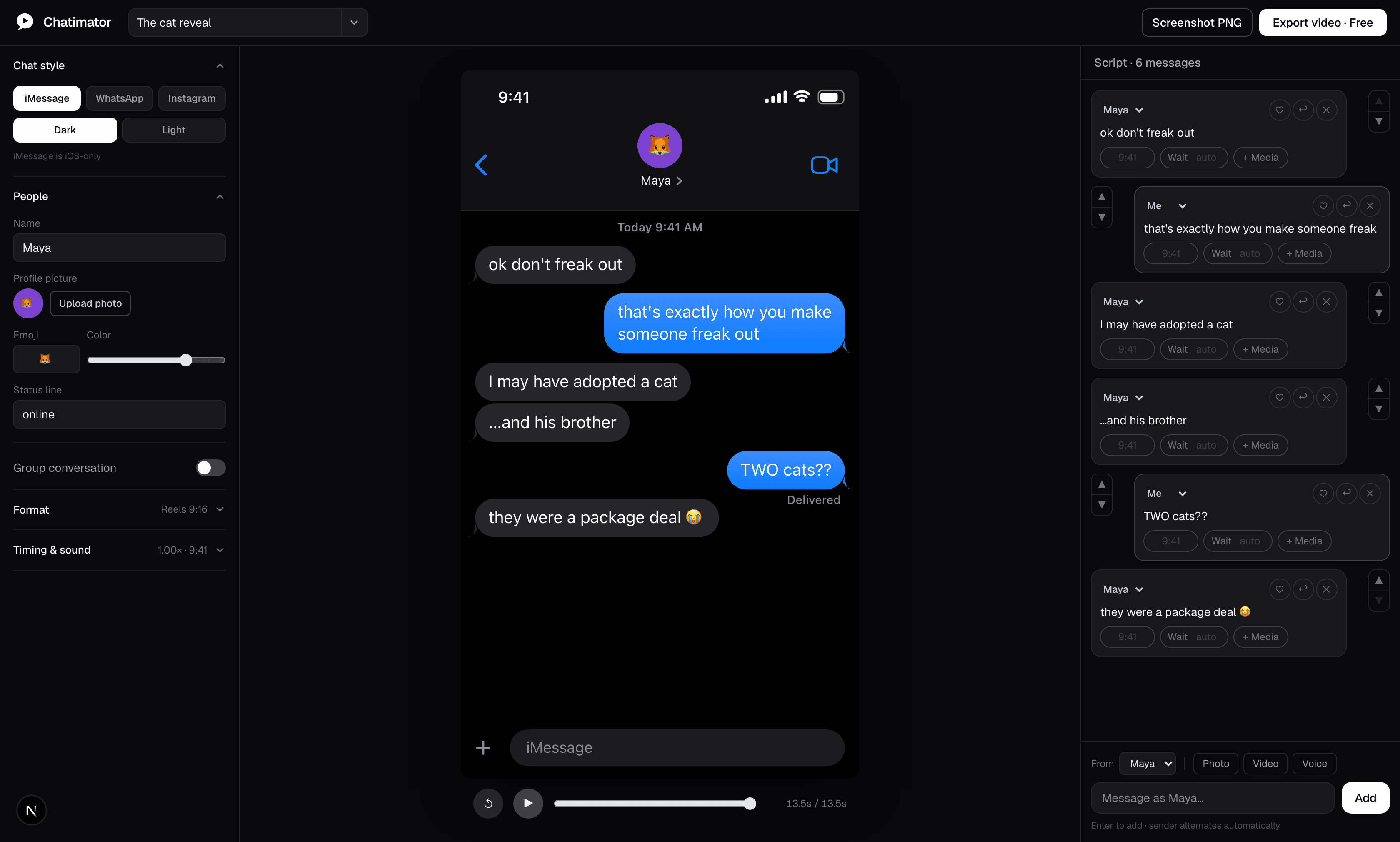
Looks exactly like the real thing
Real exports, straight from the editor — every status bar, tick, reaction and typing dot drawn platform-faithfully.
Why creators switch to Chatimator
Built for text-story videos first — screenshots are the bonus, not the other way around.
Export video, in your browser
Animated MP4s with typing indicators and message sounds — up to 1080p 60fps on Pro. Start free with one watermarked 720p export a month.
Rendered on your device
Powered by WebCodecs. Your conversations never touch a server — no uploads, no queues, no waiting rooms.
Write it — or describe it
Type messages the way you'd send them, or give AI the premise and it writes the whole conversation: cast, pacing, reactions, punchline.
Pixel-faithful platforms
iMessage, WhatsApp and Instagram DM in light and dark — status bars, tails, ticks, typing dots, reactions and replies.
Made for every feed
One click switches between 9:16 for TikTok, Reels and YouTube Shorts, square, and 16:9 for YouTube — with a customizable backdrop.
Groups, media, voice
Group chats with named members, photo and video bubbles, voice notes with waveforms, emoji reactions and quoted replies.
One editor, every text-story format
Guides for each thing people make with Chatimator — pick yours and start from there.
How to Make a Fake Text Message Video
From a blank chat to a post-ready MP4 in a few minutes — step by step.
Fake iMessage Chat Generator
Blue bubbles, gray bubbles, typing dots and 'Delivered' — exactly like iOS.
Fake WhatsApp Chat Generator
Green bubbles, blue ticks, voice notes and the doodle wallpaper — on iOS or Android.
Fake Instagram DM Generator
Gradient bubbles, avatars and 'Active now' — Instagram Direct, recreated.
Text Story Video Maker for TikTok, Reels & Shorts
The chat-story format that gets millions of views — without After Effects.
Fake Group Chat Video Generator
The group-chat chaos format — multiple members, names, avatars and all.
Frequently asked questions
What is Chatimator?
Chatimator — often heard and searched as "chat animator", which is exactly what it is — is a fake text message video maker. You write a conversation, it animates like a real phone chat — iMessage, WhatsApp or Instagram DM — and exports as an MP4 with typing indicators and message sounds. The editor is free to try; exporting takes a free account.
Is it free? Is there a watermark?
There's a free plan and a Pro plan. Free includes one 720p export per month with a small watermark, 10 AI scripts per month and the core editor — group chats, media messages and sounds included. Pro ($5.99/month) unlocks unlimited 1080p 60fps exports with no watermark, every device frame, lock-screen notification videos, 200 AI scripts per day and priority support.
Can AI write the conversation for me?
Yes. Describe the story in a sentence — "wrong number text that spirals" — and AI writes the whole script: characters, short punchy bubbles, pacing, reactions and an ending. It works for group chats too, and you can edit every message afterwards. The free plan includes 10 AI scripts per month; Pro raises that to 200 per day.
Are my conversations private?
Yes. Rendering happens in your browser with WebCodecs; your chats are never uploaded and projects save to your browser's local storage. The one exception is opt-in: if you use the AI script generator, the topic you type is sent to generate the script — nothing else.
Which chat apps can it imitate?
iMessage (iOS), WhatsApp (iOS or Android styling) and Instagram DM — each in dark and light mode, with platform-correct bubbles, ticks, receipts, voice notes and typing indicators.
Can it show the message being typed on a keyboard?
Yes. Keyboard mode renders an iOS or Android keyboard and types outgoing messages with human rhythm, realistic typos and corrections, plus per-keystroke click sounds in the export.
What can I use the videos for?
TikTok, Reels and YouTube Shorts text stories, faceless YouTube texting-story channels, skits, ads, explainers, teaching digital literacy, and UI mockups. Label fictional conversations clearly and never use them to deceive or harm real people.
Your next text-story is one tab away
Free to try, no upload — everything renders in your browser. Open the editor, write a conversation, and export your first video with a free account.
Open the editor