Fake iMessage Chat Generator
Blue bubbles, gray bubbles, typing dots and 'Delivered' — exactly like iOS.
Chatimator recreates Apple's Messages app in detail: the blue-to-gray gradient on sent bubbles, the tail on the last bubble of a group, the centered contact header with avatar, the 'Delivered' receipt under your last message, the iOS status bar with 9:41, and the ellipsis typing indicator that pulses before a reply lands.
Because it's video-first, you can export the whole conversation as an animated MP4 — including an optional on-screen iOS keyboard that types outgoing messages character by character with realistic human rhythm, typos and corrections. Or export a still PNG if you just need a screenshot.
Example: Mom discovers tapbacks
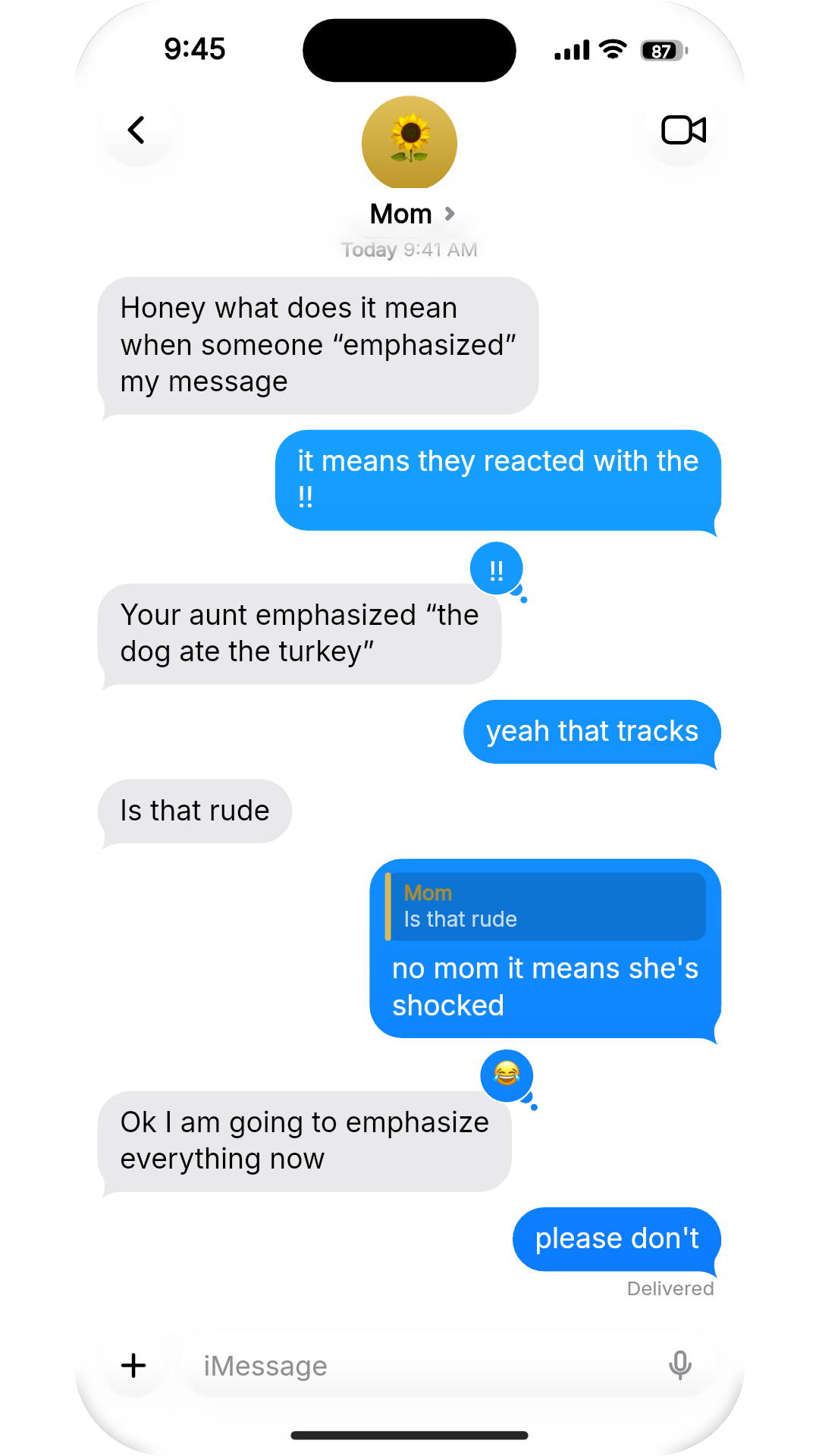
- Mom: Honey what does it mean when someone “emphasized” my message
- You: it means they reacted with the !!
- Mom: Your aunt emphasized “the dog ate the turkey”· reacted ‼️
- You: yeah that tracks
- Mom: Is that rude
- You: no mom it means she's shocked
- Mom: Ok I am going to emphasize everything now· reacted 😂
- You: please don't
A parent learning iMessage reactions. Tapbacks pin to the corner of the bubble they react to, a quoted reply threads the answer under the right question, and 'Delivered' sits under the last blue bubble only. Light mode, iPhone 15 Pro.
What you get
Authentic iOS details
Bubble gradients and tails, Delivered receipts, emoji-only large rendering, tapback-style reactions, the iMessage input bar and the iOS keyboard.
Dark and light mode
Both iOS appearances, drawn with the exact background, bubble and text colors.
Typing indicator
The three-dot ellipsis bubble appears before incoming messages, timed to message length.
Live keyboard typing
Optional keyboard mode types your messages on screen with human pacing, fat-finger typos and backspace corrections.
Send & receive sounds
Message tones are mixed into the export's audio track at the exact frame each bubble lands.
How it works
- 1
Pick iMessage
Choose the iMessage skin and dark or light mode in the editor's Chat style panel.
- 2
Write and customize
Add messages, set the contact's name and photo, add reactions, replies, photos or voice notes.
- 3
Export video or screenshot
Download an animated MP4 or a PNG still — the free plan includes one export a month, Pro removes the limits.
The iMessage details that give a fake away
- Tails only on the last bubble of a run
- Consecutive messages from the same person stack without tails; only the last one gets the hook. Chatimator groups runs automatically, so split a long thought into two or three short bubbles — exactly how people really text.
- 'Delivered' appears once
- Real iMessage shows the receipt under your most recent sent message only, never under every bubble. It's the most common mistake in hand-made mockups.
- Emoji-only messages are big
- A message of one to three emoji renders large with no bubble around it. Use it as a reaction beat — it reads instantly even on a small feed.
- Tapbacks vs. replies
- A tapback (❤️ 👍 😂 ‼️ ❓) reacts to a bubble; a quoted reply answers one specific earlier message. A thread that uses both feels lived-in.
- 9:41 isn't random
- Apple sets the clock to 9:41 in its product shots, and that's the editor default. Change it if you want the screenshot to feel candid rather than staged.
Frequently asked questions
Can I make a fake iMessage video, not just a screenshot?
Yes — that's Chatimator's specialty. Conversations export as animated MP4s (up to 1080p 60fps on Pro) with typing indicators, message sounds and optional live keyboard typing.
Does it show 'Delivered' like real iMessage?
Yes, a Delivered receipt renders under your most recent sent message, and the date chip shows 'Today' with your chosen time.
Can I use my own profile picture?
Yes. Upload any photo for the contact avatar, or use an emoji with a colored gradient background.
Does it work for group iMessage chats?
Yes — enable Group conversation to add multiple named members with their own avatars; sender names appear above bubbles like real group threads.
Related tools
Try it now — free to start
Open the editor, write your first conversation and preview it instantly — then export with a free account.
Open the editor