Keyboard Typing Video Maker
Watch the message being typed — keys, clicks, typos and all.
The most convincing text-story videos don't just show messages appearing — they show them being typed. Chatimator's keyboard mode renders a full on-screen keyboard (iOS or Gboard-style Android, dark or light) and types your outgoing messages into the input bar character by character, with a blinking caret and a send button that lights up.
The typing is modeled on real humans: around eight characters per second with natural variation between keystrokes, longer pauses after punctuation, occasional hesitations, and — the detail that sells it — realistic fat-finger typos on adjacent keys that get noticed, backspaced and corrected. Emoji behave like a phone too: a pause to open the emoji panel, then the emoji lands in one tap. Keyboard clicks are mixed into the export at the exact frame of each keystroke.
Example: Asking about the raise
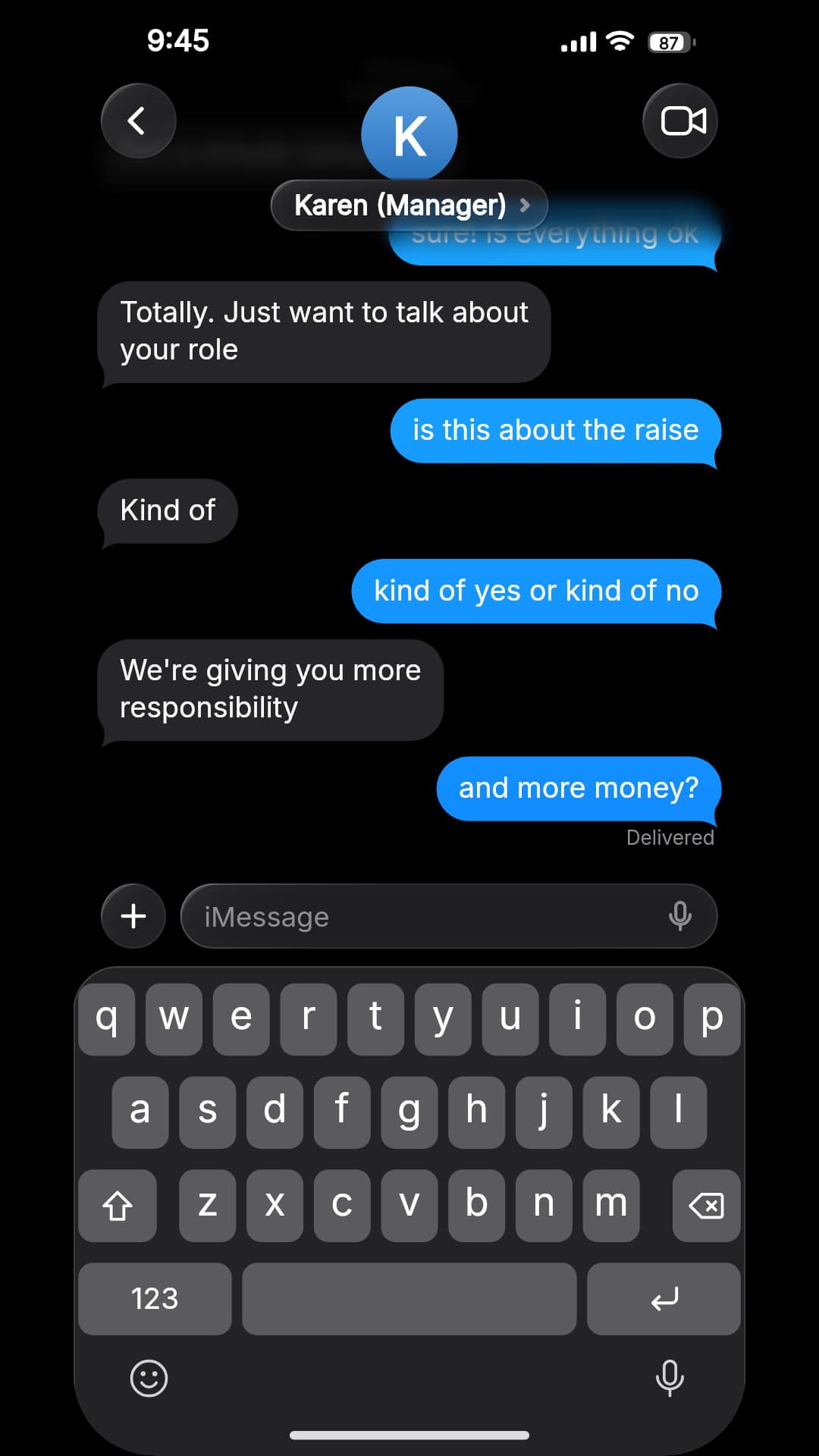
- Karen (Manager): Got a minute tomorrow?
- You: sure! is everything ok
- Karen (Manager): Totally. Just want to talk about your role
- You: is this about the raise
- Karen (Manager): Kind of
- You: kind of yes or kind of no
- Karen (Manager): We're giving you more responsibility
- You: and more money?
A POV story where the viewer does the typing: outgoing messages are typed live into the input bar, so the iPhone keyboard owns the bottom of the screen and the thread above it stays short. The rhythm, typos and corrections only exist in the video — this is its last frame. iMessage dark mode, iPhone 13/14.
What you get
Real keyboard chrome
iOS keyboard or Android Gboard style, in dark and light, with the key being pressed highlighted.
Human typing rhythm
Variable keystroke timing, punctuation pauses and hesitations — never metronome-uniform.
Typos and corrections
Occasional adjacent-key mistakes get visibly backspaced and fixed, like a real person.
Keyboard click sounds
Every keystroke, including backspaces, clicks in the export audio in sync with the animation.
Deterministic exports
The rhythm is seeded per message, so re-exports are frame-identical.
How it works
- 1
Toggle keyboard typing
Enable On-screen keyboard typing in the Timing & sound panel.
- 2
Write the messages
Outgoing messages get typed live; incoming ones keep the typing-dots indicator.
- 3
Export
Download the MP4 — typing animation, clicks and message sounds included.
Writing for keyboard mode
- Keep outgoing messages short
- Typing runs at roughly 7–8 characters a second, so a 70-character message takes about ten seconds. Split long thoughts into two or three bubbles.
- Put the drama in what you send
- Only outgoing messages are typed on the keyboard — incoming ones keep the typing dots — so it suits POV stories where the viewer is the one typing.
- Expect less thread on screen
- The keyboard covers the bottom of the phone, so fewer bubbles are visible at once. Quick back-and-forth works better than long monologues.
- Typos are part of the effect
- The occasional adjacent-key slip and backspace is what makes it read as a screen recording. It's seeded per message, so re-exporting gives the identical take.
- Match the keyboard to the phone
- iMessage always shows the iPhone keyboard; WhatsApp and Instagram follow the OS switch, so choose Android for the Gboard-style keyboard.
Keyboard mode in the help center →
Frequently asked questions
Does the typing look real?
Yes — it runs about 8 characters per second with natural variation, pauses at punctuation, occasional hesitations, and realistic typo-and-backspace corrections on QWERTY-adjacent keys.
Which keyboards does it show?
An iOS-style keyboard or an Android Gboard-style one, following your OS setting, each in dark and light.
Are keyboard sounds included?
Yes, per-keystroke clicks (including backspace) are mixed into the exported audio in sync with the animation.
Related tools
- Text Story Video Maker for TikTok, Reels & Shorts
- Fake iMessage Chat Generator
- How to Make a Fake Text Message Video
Try it now — free to start
Open the editor, write your first conversation and preview it instantly — then export with a free account.
Open the editor